
Coursera: Technical UX writing

The challenge
I led content strategy and technical UX writing for programming products on Coursera, advising product teams and creating reusable content patterns embedded in the content design system to improve clarity and learner satisfaction across multiple user journeys.
Coursera delivers programming experiences that require precise, learner-focused technical content. I partnered with product teams to design content solutions for several high-impact features:
On-platform programming assignments (Coursera Labs, Quick Labs)
Course and project groupings by skills (SkillSets)
Skills testing (LevelSets)
Short project-based courses (Guided Projects, formerly Rhyme)
Scope These initiatives spanned multiple user flows, verticals, and audiences. I mentored four product designers and collaborated with engineers, PMs, and other content practitioners to ensure consistent, scalable content.
SERVICES Content strategy, content modeling, information architecture, navigation, technical UX writing, microcopy, email content and templates.
APPROACH
Authored the Technical UX Writing guidelines embedded in the Content Design System (CDS), including content patterns for every component so devs, PMs, designers, and content designers can write consistently.
Defined voice and tone tailored to technical learners: clear, concise, and kind.
Developed taxonomy, reusable content models, and IA to support component-driven content.
Wrote and iterated microcopy for UI states, including transparent loading states and Guided Project email notifications.
Validated content through A/B tests and cross-functional reviews.
RESULTS
Learner satisfaction rose from 67% to 72% (statistically significant within 8 weeks).
Delivered CDS‑embedded guidelines and reusable content patterns that reduced writer/designer effort, improved consistency across components, and scaled to multiple teams.
Integrated content models into ML and search pipelines, improving discovery for LevelSets, SkillSets, and Skills.
Work contributed to continued product development of Labs and Guided Projects following Coursera’s acquisition of Rhyme (acquired by Coursera in 2019; product expansion through 2020–2022).
Contextual note: this product-area momentum precedes Coursera’s later merger with Udemy (announced Dec 2025), demonstrating ongoing strategic consolidation in the online learning space.
Scalable content patterns and cross‑functional technical writing
I partnered with product managers and designers to define Technical UX Writing standards and scalable content patterns embedded in the Content Design System. Working cross-functionally with PMs, engineers, designers, and other content practitioners, I translated systems-level requirements into reusable content components and content models that supported both UI and ML workflows.
I delivered CDS-embedded content patterns for every component and training-ready content artifacts for LevelSets, SkillSets, Skills, and more. To ensure consistency, I mentored product designers, advised on implementation trade-offs, and ran A/B tests to validate copy and IA decisions.
These patterns and guidelines reduced friction for writers and designers, accelerated delivery of complex technical flows, and improved consistency across learner journeys. The content models I authored were integrated into ML and search pipelines, improving discovery and enabling more accurate skills and course matching. My contributions supported measurable product outcomes and scaled across teams building technical learning experiences.
The two projects below are examples from the 100+ technical initiatives I worked on at Coursera during 2020 and 2022. They reflect broader, CDS‑embedded practices and cross‑functional collaboration that informed Labs, Guided Projects, LevelSets, SkillSets, and related product work.
Guided Project email redesigns
With retention and completion KPIs, we A/B tested email variants sent to learners and course authors. I worked directly with product manager Emo to review context, data, technical requirements, and user constraints, then translated those findings into tested content treatments. In every case, the redesigned versions outperformed the originals.
Fun fact: Emo and I co‑sponsored a coworker study group for the Coursera course "Emotional Intelligence: Cultivating Immensely Human Interactions" to improve team emotional intelligence and professional collaboration.
Early impact and CDS origins
In my first two weeks at Coursera I designed and wrote 59 transactional email templates for Enterprise (including a new upsell workflow for Coursera for Teams), identified several email‑flow gaps, and proposed upsell opportunities. Product manager Kyle and Design Manager Geoff endorsed the work and recommended hiring me full time as a content designer — the role that launched content design practices at Coursera and contributed to the CDS and broader technical UX writing efforts.
Project Files email
Context from Product manager
Emo provided the following brief in Figma to guide the update:
Persona: Learner
Purpose: To provide learners with downloadable link to the original files provided by the instructor for this project.
Additional details: These are not the files the learner produced at the end of the project but the starting point provided by the instructor.

Before

After
Cloud Workspace deletion email
Context from Product manager
Emo provided the following brief in Figma to guide the update:
Persona: Author
Purpose: Sometimes, the engineering team is making changes on the default templates. This email is used to notify instructors about the update and to nudge them to upgrade to the latest cloud workspace.
Additional details: An important missing part here is how they can upgrade to a different cloud workspace, since this isn't entirely self serve operation.

Before

After
Cloud Workspace Upgrade email
Context from Product manager
Emo provided the following brief in Figma to guide the update:
Persona: Author
Purpose: Authors are notified that cloud workspace that they have created in their accounts and haven't been used to create projects will be terminated (deleted) in certain amount of days.

Before

After
Transparent loading states FOR PROGRAMMING COURSES
I collaborated with Vera — the product designer for Coursera Labs and Guided Projects — on ongoing efforts to improve transparent loading states across programming courses. We used iterative design thinking: competitive analysis, hands‑on learner empathy (by taking courses ourselves), qualitative content testing with UX Research, and quantitative validation with Data Engineering.
These high‑priority experiments — aligned with Coursera’s original mission set by founders Andrew Ng and Daphne Koller in 2012 — focused on making background processes visible and reducing learner uncertainty during Labs and Guided Projects.
We A/B tested the existing live experience against variants featuring clearer progress indicators, time‑released microcopy, and actionable error messaging. Working closely with Vera and cross‑functional partners, I authored jargon‑free microcopy and content patterns that explained what was happening behind the scenes and guided recovery when failures occurred.
The iterative tests consistently favored the transparent variants, improving learner confidence and satisfaction while maintaining technical accuracy and scalability across the CDS.
Coursera Labs
BEFORE The original message —“Error: This lab has failed to launch. Please wait a few minutes and try again” — was vague, confusing, and did not explain the state or next steps.
When a cloud connection error occurred, the UI only told learners the lab failed to launch and asked them to “wait a few minutes and try again,” leaving them uncertain about the cause, expected wait time, or how to recover.
AFTER We replaced the single-line loader with a progress timeline and time‑released microcopy that explain stages, set expectations, and offer recovery actions. Examples:
Progress timeline — Activating your account.
Progress timeline (45s) — Preparing files.
Progress timeline (90s) — Creating your workspace.
Progress timelines (120s) — Validating your workspace.
IMPACT These progress‑timeline patterns make setup visible, reduce uncertainty, and provide clear next steps for learners.
We also partnered with engineering to detect and auto-recover from common backend failures — reducing the need for learner reloads and surface-level troubleshooting.

BEFORE

After
TRANSPARENT Guided Projects Loading staTES
BEFORE The original label—“Connecting…”—was ambiguous and left learners unsure whether the workspace was loading, how long it would take, or if an error had occurred.
AFTER We replaced “Connecting…” with a progress‑timeline label and supportive microcopy: “Starting your cloud workspace. This may take 1–3 minutes.” Time‑released updates (e.g., “Still working — roughly halfway through setup.”) and an explicit success state (“Workspace ready — you can begin the project”) reassure learners and reduce unnecessary refreshes.
IMPACT These clearer states—developed with Vera and implemented alongside backend auto‑retries—reduced perceived limbo, lowered refresh attempts, and improved learner confidence during Guided Projects.

BEFORE

After

Cloud workspace
BEFORE The original loading UI communicated little beyond “Connecting…” or “Validating your workspace,” leaving learners uncertain whether the workspace was loading, how long it would take, or if an error had occurred. This uncertainty drove needless refreshes and frustration.
AFTER We replaced the single-line loader with timed, multi-step progress timelines (4–6 staged states) and supportive microcopy that explained what was happening, set expectations, and suggested useful actions learners could take while they waited. The copy paired with backend auto-retries and clear error recovery paths when retries failed.
IMPACT
Increased learner confidence and enjoyment when completing programming assignments and Guided Projects.
Reduced backend retries and user‑initiated reloads, lowering cloud usage costs associated with workspace provisioning and improving operational efficiency.
Improved retention and completion for high-value programming content, contributing to measurable gains in learner satisfaction.
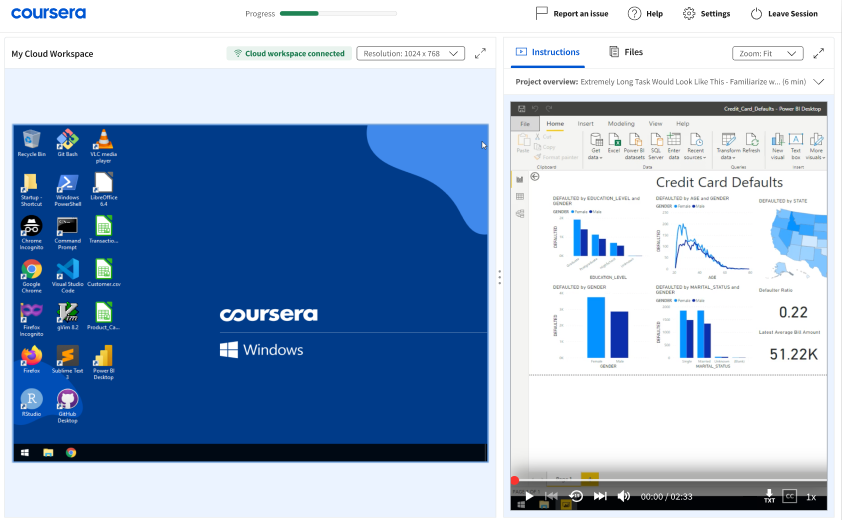
SCREENSHOTS The six screenshots below show tested cloud-workspace loading state flows (quantitative and qualitative user research) we validated before release; three highlighted images focus on timed updates, recovery messaging, and suggested learner actions.

Loading state with time estimate | Microcopy: This could take 2 minutes or longer—Start watching your first video while you wait
Loading state with shortcut recommendations | Microcopy: Try out the keyboard shorcuts you can use—Press and hold Shift + ? to see the list and start exploring

Loading state with learning suggestion | Microcopy: You can expand the instruction window to watch the video in full view

Loading state right before connecting | Microcopy: Hold tight—your cloud workspace will be ready soon

Loading state when an error first occurs | Microcopy: It's taking longer than expected

Loading state with reconnecting messaging | Microcopy: This could take up to 3 minutes—The connection was lost and we're reconnecting